What Is Two Factor vs Two Step? Stop Confusing Them and Lock Your Accounts
You set up a code from your phone after your password and felt safe. But did you activate two-factor authentication or just two-step verification? Attackers exploit this exact confusion every day. This article cuts through the noise to show exactly what is two factor vs two step, so you can close the gap before a breach happens.
Authentication Fundamentals
Digital security starts with proving who you are. Systems ask for one or more proofs before granting access. These proofs fall into three distinct categories—something you know (a password), something you have (a physical key), and something you are (a fingerprint). When you combine categories, you build a layered defense.
Every login you perform relies on one or more of these factors. A bank might ask for a PIN and a card. An email provider might ask for a password and a code from an app. Understanding these categories makes the two factor vs two step discussion crystal clear.
What Two-Factor Authentication Really Means
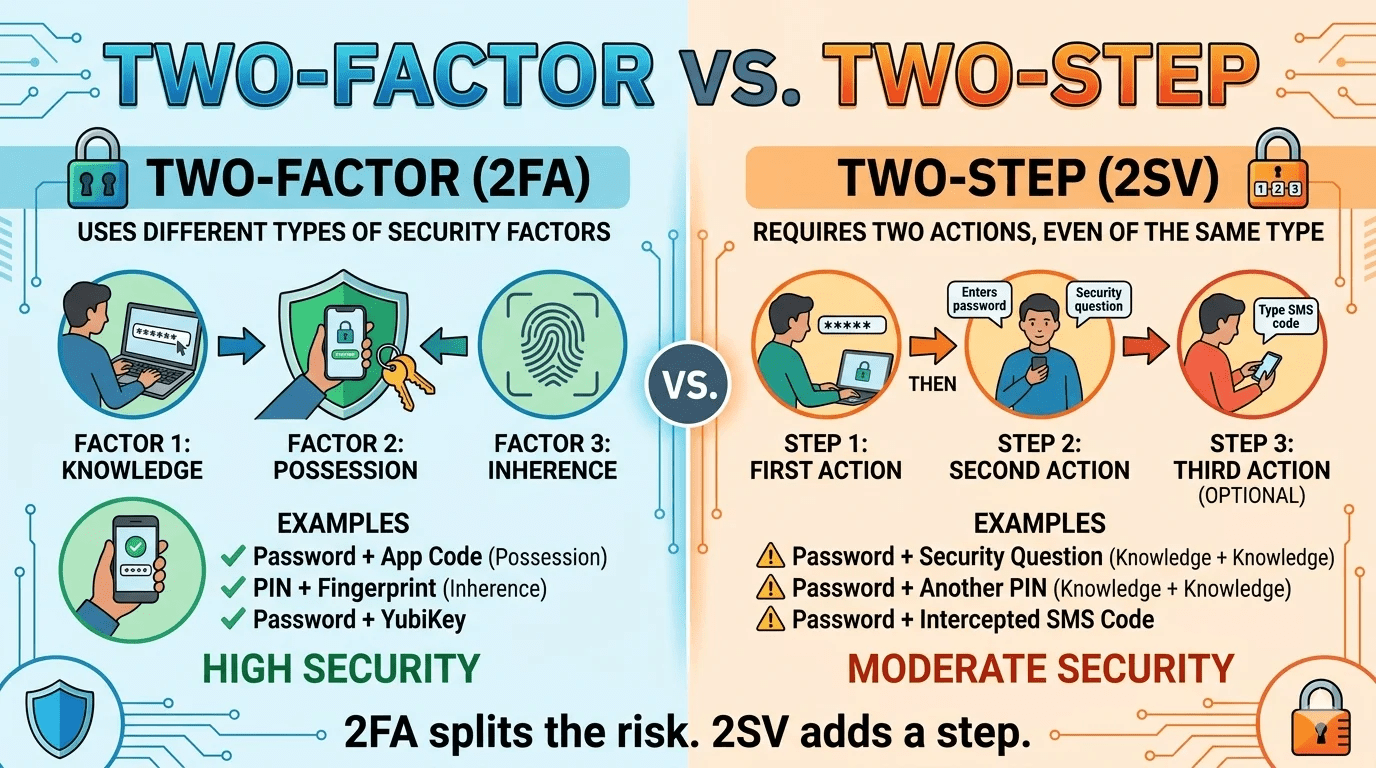
Two-factor authentication, often called 2FA, demands two different types of factors from the three available categories. You cannot use two passwords and call it two-factor. The system must verify something you know and something you have, or something you know and something you are, or something you have and something you are.
For example, when you withdraw cash from an ATM, you combine a bank card (something you have) with a PIN (something you know). That is true two-factor authentication. Online, logging into a work portal with a password and a fingerprint scan also qualifies. The critical rule stays simple: two separate factor categories, never the same type repeated.
Many security experts, including the National Institute of Standards and Technology (NIST SP 800-63B), stress that authenticators must come from independent channels to block common attacks.
Unpacking Two-Step Verification
Two-step verification, or 2SV, adds a second step to the login process. That second step does not have to be a different factor type. You might enter a password, then answer a security question. Both steps fall into the “something you know” category. This sequence still counts as two-step, but it fails the two-factor test.
Another widespread example happens when a website sends a one-time code via email after you type your password. If your email account also relies on just a password, both steps still belong to the same knowledge factor. Two-step verification raises the barrier for attackers, yet it does not deliver the full protection of mixed factors.
The Critical Distinction Explained
When someone asks what is two factor vs two step, the answer centers on one word: factors. Two-factor authentication always uses two distinct factor types. Two-step verification uses two sequential checks, but they may be the same type. All two-factor authentications are a form of two-step, but many two-step verifications lack true second-factor strength.
Imagine a door with two locks. Two-factor means one key is a physical metal key and the other is a fingerprint scanner. Two-step could mean two metal keys you keep on the same keychain. When someone steals your keychain, they get both. That mental picture explains what is two factor vs two step better than any tech jargon.
A Side-by-Side Comparison Table
| Aspect | Two-Factor Authentication (2FA) | Two-Step Verification (2SV) |
|---|---|---|
| Factor Variety | Requires two different factor categories | May use two steps from the same category |
| Common Combinations | Password + hardware security key, fingerprint + PIN | Password + backup code, password + security question |
| Resistance to Phishing | High when using FIDO2 keys or biometrics | Lower if both steps are knowledge-based |
| User Effort | Slightly higher initial setup | Often feels similar day-to-day |
| Real-World Example | Banking app with face scan and PIN | Forum login with password and emailed link |
Real Examples You Encounter Daily
Open your phone. Unlocking it with a face scan plus a passcode blends something you are and something you know — true 2FA. Google prompts on your trusted device after a password combine possession and knowledge, qualifying as two-factor. Meanwhile, a retail site that asks for a password and then your mother’s maiden name uses two steps, but both are things you know. That is two-step, not 2FA.
Cloud storage services often market “two-step verification” when they actually push an app notification. The notification confirms possession of your phone, so the method meets 2FA criteria despite the label. What is two factor vs. two step in practice can be found by reading the fine print.
Why Marketing Blurs the Lines
Companies frequently use “two-factor” and “two-step” as synonyms because the distinction sounds technical. Marketing teams prioritize simple messages over precise security terminology. They might tout “two-factor login” for a process that is technically 2SV if a user configures only a secondary password.
Always check the method, not the name. If the second action requires a physical device you hold or a biometric you present, you have two-factor. If it relies on a memorized secret or a code delivered to an unsecured inbox, you might have a weaker two-step setup.
Security Impact: A Clear Analysis
Attackers crack password databases constantly. If you use two-step verification with two knowledge factors, one database leak exposes both steps. Two-factor authentication stops this attack because the second factor—like a hardware key—cannot be stolen through a server breach. Google’s security research shows that phishing-resistant 2FA blocks 100% of automated bot attacks and bulk phishing.
Financial institutions and government services now require true multi-factor authentication. The FIDO Alliance and Microsoft have pushed passkeys and security keys to replace pure knowledge-based verification. These shifts highlight the real-world stakes behind what is two factor vs two step.
How to Audit Your Current Login Methods
Go to your most sensitive accounts. Check the security settings and look for “two-factor authentication” or “two-step verification.” Note what the second step requests. Does it ask for a code generated by an authenticator app, a hardware key tap, or a biometric scan? Those are solid 2FA indicators. Does it request a secondary password or a security question? That’s likely just two-step.
Prioritize upgrading financial, email, and social media accounts first. Even within 2FA, methods differ. SMS codes count as two-factor because the phone is something you have, but SIM swapping attacks weaken that approach. An authenticator app or FIDO2 security key offers stronger protection.
Moving Toward Stronger Protection
Start by enabling any available form of 2FA today. A second step, even via SMS, beats a lone password. Then replace weaker methods with phishing-resistant options. YubiKeys, Google Titan Security Keys, and passkeys stored on your device eliminate shared secrets that phishing sites can capture.
Train your family and colleagues on what is two factor vs two step. A quick conversation stops them from assuming a backup code equals a second factor. Clear language and hands-on setup remove the intimidation factor that keeps people stuck on passwords alone.
Frequently Asked Questions
In layman’s words, what is two factor versus two step?
Two-factor means you prove your identity with two completely different types of proof, like a password and a fingerprint. Two-step just means you go through two checks, even if both are passwords. So, all two-factor is two-step, but not all two-step is two-factor.
Does receiving a code via SMS make my account two-factor?
Technically yes, because your phone is something you have. However, SMS-based codes face risks like SIM swapping. For sensitive accounts, use an authenticator app or security key instead.
How can I quickly spot what is two factor vs two step on a website?
Look at what you supply after the password. If it’s a code from a separate physical device or your fingerprint, you’re likely using two-factor. If it’s another memorized secret, it’s just two-step.
Why do security experts push for true 2FA?
Two-factor authentication stops stolen passwords from working alone. An attacker needs your physical device or biometric data, which they almost never have. Two-step with duplicate knowledge factors leaves you exposed if both secrets leak.
Can two-step still protect me?
Absolutely. Any extra barrier reduces risk. Many breaches rely on mass credential stuffing, and even a secondary password stops those attacks. Then evolve to true 2FA for high-value accounts.
What is the strongest form of two-factor right now?
FIDO2 hardware security keys and device-based passkeys that use public-key cryptography. They resist phishing, server breaches, and man-in-the-middle attacks. NIST and major tech companies recommend them first.
Keep Your Accounts Safer Starting Today
You now know what is two factor vs two step and why the difference matters. Open your password manager, audit five critical logins, and turn on the strongest available multi-factor option. Swap SMS fallbacks for authenticator apps. Grab a pair of inexpensive security keys for your primary email and financial accounts.
Small changes in how you verify your identity block the vast majority of cyberattacks. Take five minutes now. Your future self will thank you when a breach notice hits the news and your accounts stay locked tight.